
SignAgent vs. CorelDRAW and Illustrator vs. a custom AI workflow: an honest comparison
Three ways sign shops get takeoffs, proposals, permit sets and shop drawings out the door, step by step: what each one automates, what a person still does, and what it costs.

CorelDRAW and Illustrator are drawing tools: every sign placement, schedule row and sheet is done by hand. SignAgent is sign program software: a person places signs on the plans, and it generates the schedules and braille, takes client approvals and tracks production. A custom workflow drafts the documents themselves, from the takeoff to the permit set and production files, in your format, and your team checks them.
Key takeaways
- By hand in CorelDRAW or Illustrator costs the least in software and the most in hours: every placement, schedule row and braille string is typed by someone.
- SignAgent automates schedules and braille once a person places the signs, and adds client review, estimates from counts and production tracking. It doesn't publish prices.
- A custom workflow reads the plan set and drafts the takeoff, then keeps going: priced proposals, permit sets with the code researched, shop drawings and production files.
- None of them removes the person who checks the work. The honest difference is how much of the drafting a person still does.
- We haven't published a time study, so we won't quote a percentage. The fair test is your own job: time it the way you do it now, then send the same job for a free sample.
On this page
Three ways to get the same documents out the door
Every sign job turns drawings into documents: a takeoff and a schedule, approval drawings and a quote, a permit set, shop drawings, production files. Shops get there three ways, and most use some mix of them.
- By hand in CorelDRAW or Adobe Illustrator. The plan goes in as a PDF, a person places the symbols, types the schedule and draws every sheet. Both programs are widely used in sign shops.
- SignAgent. Software built for sign programs. Its Design product lets a person place signs on location plans and generates the schedules; its Build product adds takeoffs, estimates and production tracking.
- A custom workflow. AI workflows set up in your shop, on your past jobs, that draft the documents themselves. Your estimator, designer or project manager checks them. This is what we set up, so weigh what we say about it accordingly.
- By hand
- Software helps, a person drives
- Automated, a person checks
- Not part of it
By hand in CorelDRAW or Illustrator
This is where most shops start, and for good reasons. Your designers already know the software, it draws any shape you can think of, and clients send artwork in it. CorelDRAW Graphics Suite 2026 is $269 a year or $549 as a one-time purchase, and Illustrator is $22.99 a month on an annual plan, at their list prices.
What it doesn't do is read a plan set. Neither program finds or counts sign locations on a PDF, and neither builds a schedule. Both can tally objects you've placed yourself: Illustrator's Document Info panel counts symbols, and CorelDRAW's Object Data Manager can total a column. So the takeoff is a person placing every symbol, typing every schedule row, setting the braille and counting by type.
The rest of the job works the same way. The permit set means reading the sign code on the city's website and drafting each sheet. Shop drawings start from a blank page, and production files are exported and nested by hand. None of it is hard for an experienced person. It's just hours, and they come back on every job.
SignAgent
SignAgent is made by SignAgent Inc. of Burlington, Ontario, which says it was founded in 2015. It describes itself as software to "manage every sign from initial design to daily operations", and it's aimed at "wayfinding designers, fabricators, installers, and sign project managers", for "large, complex environments".
Its strengths are real. In SignAgent Design, a person places signs directly on the location plans and the software generates the schedules, and it says it eliminates manual braille and language translations. Each sign type can carry your layouts, rules, fields, materials and artwork templates, built in Illustrator. Clients review with approve and reject buttons, and reviewers are free. SignAgent Build adds takeoffs (import the plans, count, assign unit costs, generate estimates), a project tracking board, locked-down artwork during production and a mobile app.
What it doesn't do, from what it publishes: we found nothing on its site about proposals with renderings, permit sets or sign code research, and its fabricator script, which batch-exports SVGs for fabrication, "is not intended to create specification drawings". The one AI feature we found announced is translation suggestions for multilingual signs, from July 2026. A person still places the signs; the software builds the schedules, braille and counts from those placements.
SignAgent doesn't publish prices; its site offers a personalized demo. It does publish results from its customers' case studies, including "Work 4x faster" and a job that took a 60-hour programming effort re-run in 7 hours. Those are its numbers, from its customers, and the 7-hour job was one the team had already done once. Users on the Signs101 forum mention a learning curve and praise its support; a 2019 trial user found it too expensive for what it did at the time.
A custom workflow set up in your shop
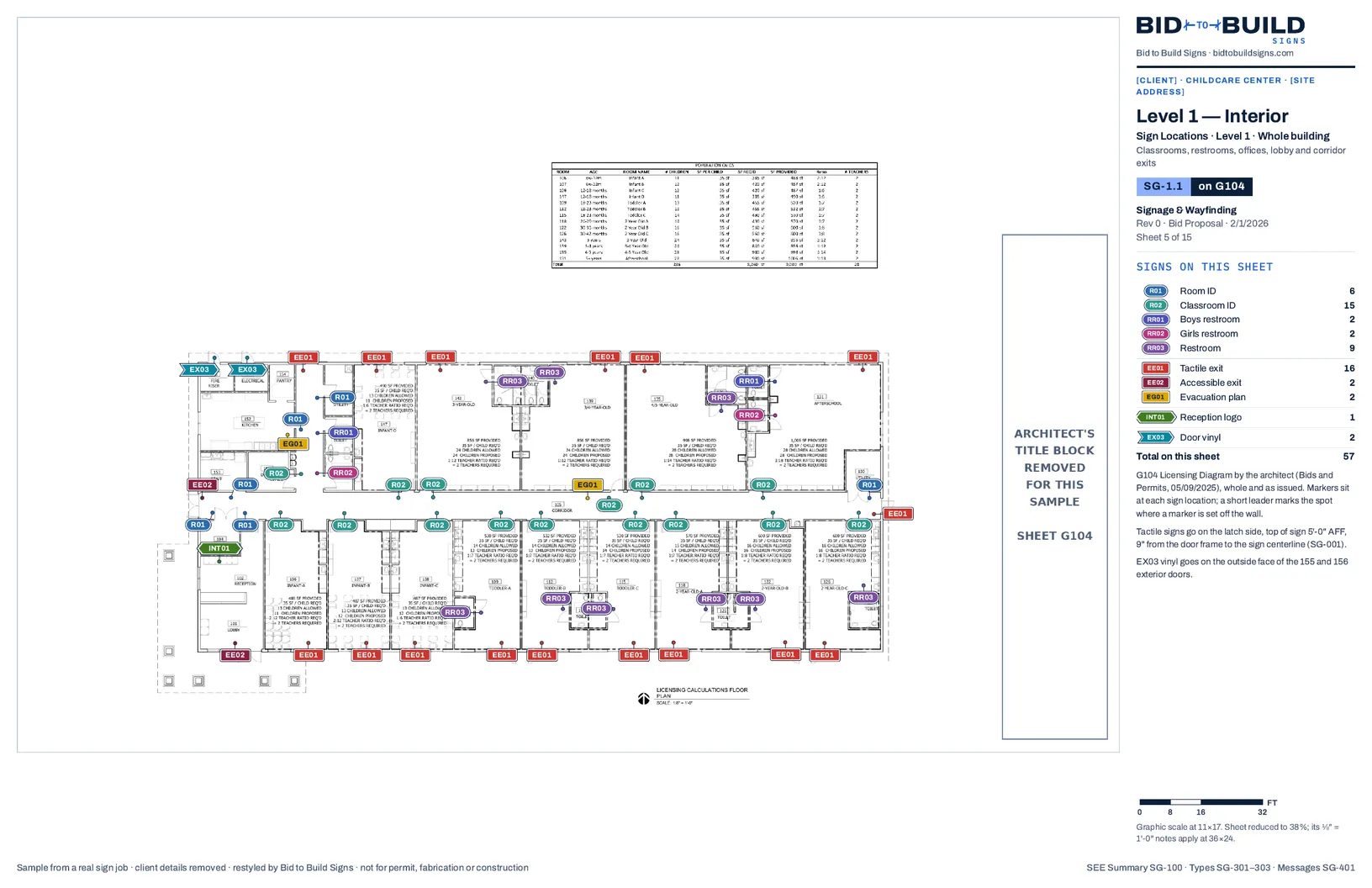
This is what we do, so here's what it is and where it falls short. We set up AI workflows in your shop, on your own past jobs, with your sign types, pricing and title block, and train your team to run them. The takeoff workflow reads the plan set, places every sign, writes the schedule and the braille and lists the open items. The others draft the priced proposal, the permit set with the sign code researched first, the shop drawings and the production files. Your people check every one.
Where it falls short: it isn't a project tracker or a client review portal, so it won't run a campus wayfinding program the way SignAgent is built to. Setup is a flat fee and takes time on your past jobs before it pays off. It's only as good as the drawings it reads, and drawings conflict, so a person has to check everything it drafts. And nobody seals drawings or promises a permit: approval stays with the client and the city.
Side by side
| CorelDRAW or Illustrator | SignAgent | Custom workflow | |
|---|---|---|---|
| What it is | Drawing software | Sign program software: Design, Build and Mobile | AI workflows set up in your shop |
| Who places the signs | You | You, on the plan in SignAgent | The workflow; your estimator checks |
| Schedules and braille | By hand | Generated from your placements | Drafted with the takeoff |
| Pricing the job | A spreadsheet | Unit costs on counts, then an estimate | Your vendor pricing, wages, production times and material takeoff |
| Permit sets | By hand | Not listed on its site | Code researched and cited, then drawn |
| Shop drawings and production files | By hand | Batch SVG export; not for spec drawings | Drawn and nested from the approved set |
| Client review | PDF by email | Online approve or reject; reviewers free | Approval set with a sign-off block |
| Tracking production and install | No | Yes: board, locked artwork, mobile app | No |
| Output format | Whatever you draw | Your sign type templates, built in Illustrator | Your title block and formats, set up on your past jobs |
| What you pay | CorelDRAW: $269 a year or $549 one-time. Illustrator: $22.99 a month, annual plan | Not published; demo first | A flat fee per workflow, setup hours included; no monthly fee to us |
| Best fit | Small jobs and a team that's fast in it | Large wayfinding and ADA programs that many people review and track | Shops whose hours go into producing takeoffs, proposals, permits and drawings |
How much time does it save?
Honestly: we haven't published a time study, and we won't quote you a percentage we haven't measured on your jobs. Hours depend on the plan set, the shop and the person. What we can show is the work a person no longer does when a workflow drafts the document, on real jobs:
- The childcare takeoff: 61 signs placed on the plan, 61 schedule rows with copy and braille, quantities by type, and 6 open items listed before pricing. The estimator checks it instead of building it.
- The Honeygrow interior set: 18 signs placed and scheduled, with 7 open items for the client and the architect, including a restroom wording question under the plumbing code.
- The Honeygrow permit set: the area check, the site plan, renderings, the elevation, a detail sheet per sign and the electrical riser, all 8 sheets drafted from the approved artwork.
So the time saved is roughly the time your people spend producing those documents now, less the time it takes to check a draft. The only way to know that number for your shop is to measure it:
Pick a recent job
One you've already taken off or drawn, with the plan set or the artwork still on file.
Write down the hours
What your estimator or designer actually spent producing it, start to finish.
Send the same job for a free sample
We run it through the workflows and send the deliverables back.
Time the check
Have the same person check our draft against the plans, and compare the two numbers.
- In The plan set comes inThe architect's PDF, plus the bid's sign schedule if there is one.
- Workflow Drafts the takeoffReads the sheets, places every sign, schedules it and lists the open items.
- Your team Checks itThe counts, the copy and every open item, against the plans.
- Your team Prices and sends itProposed for client approval, and never final until someone signs off.
Which one should you pick?
- Stay in CorelDRAW or Illustrator if your jobs are small, your team is fast in the software and the hours aren't hurting. The software cost is low and you already own it.
- Look at SignAgent if you run large wayfinding or ADA programs where many people review, approve and track hundreds of signs across a site, and you want one system to hold it all. Placement is still a person's job, and you'll need a demo to see the price.
- Set up a custom workflow if the hours go into producing the documents themselves: takeoffs from plan sets, approval sets with quotes, permit sets with code research, shop drawings and production files, in your own format and without a monthly subscription.
They aren't mutually exclusive. Production files from a workflow come out as DXF, SVG and PDF, which open in CorelDRAW or Illustrator for anything your designer wants to touch by hand.
Sources
- SignAgent, home page
- SignAgent Design
- SignAgent, sign project delivery
- SignAgent Build
- SignAgent, about us
- SignAgent, AI-powered translation tool announcement
- SignAgent case study: 3D Identity by Elements
- SignAgent marketplace launch, SEGD member news
- Signs101 forum: alternatives to SignAgent for plan reviews
- Corel: CorelDRAW Graphics Suite 2026 announcement and pricing
- Adobe Illustrator plans and pricing
- Adobe Illustrator Document Info panel
- CorelDRAW help: view and print object data
- Graphics Pro: staying up to date on sign design programs