
AI for sign companies: 16 honest answers
What AI can and can't do for takeoffs, proposals, permit sets and shop drawings, from a sign shop that uses it on its own jobs. Where it falls short, we say so.

AI can draft a sign company's takeoffs, proposals, permit sets, shop drawings and production files from the plan set and the client's artwork, in the shop's own format. It doesn't replace the estimator or designer: a person answers the open items, prices the job and signs off on every drawing, and approval stays with the client and the city.
Key takeaways
- AI drafts the documents; your estimator, designer or project manager checks them and decides.
- It's only as good as the drawings it reads, so a good workflow lists conflicts instead of guessing.
- Output should look like your shop's, because setup is done on your past jobs and title block.
- With us it's setup and training for a flat fee per workflow, not a monthly subscription.
- Nobody can promise permit approval, and nobody should seal drawings an engineer didn't design.
On this page
- What can AI do for a sign company today?
- Will AI replace my estimator or designer?
- Can AI read an architect's plan set?
- Does it know the ADA sign rules?
- Can AI draw a permit set the city will approve?
- What does AI get wrong?
- Will the drawings look like my shop made them?
- Can it price a job?
- Is it a monthly subscription?
- How long does setup take?
- Who checks the drawings?
- What happens to my client's files?
- What do I send for a free sample?
- How is this different from using ChatGPT?
- Can it help with service and repair work?
- Where should a sign shop start?
Straight answers to the questions sign company owners, estimators and designers ask us about AI. We use these workflows on our own jobs at Zealot Signs, so the examples are real, and so are the limits.
What can AI do for a sign company today?
It can draft the documents that eat an estimator's or a designer's week: a takeoff that places and schedules every sign on a plan set, client approval drawings with a priced quote, a permit set with the sign code researched first, shop drawings and production files. A person checks each one before it goes out.
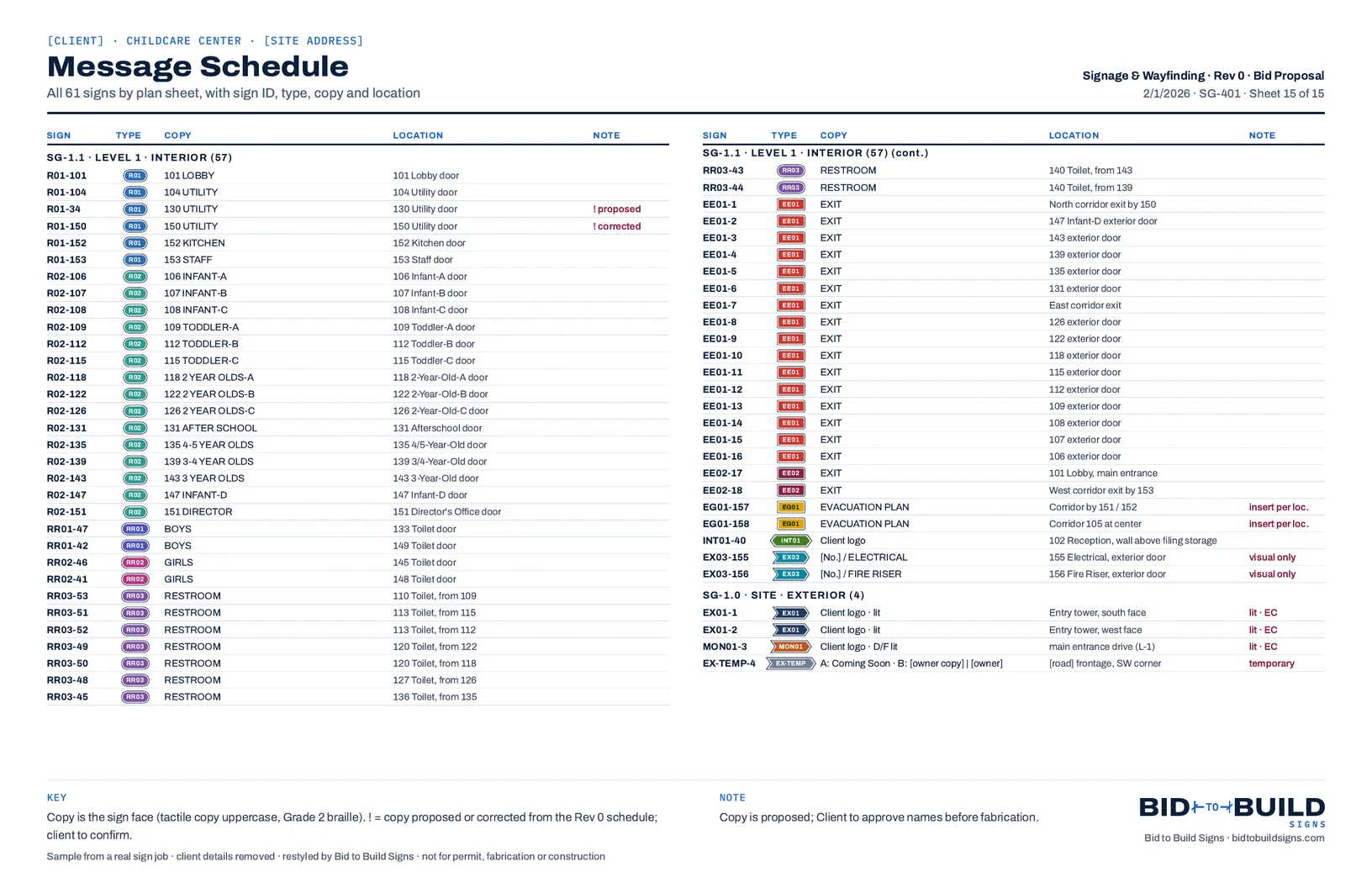
Every sheet of a real example of each is on the workflow pages.
Will AI replace my estimator or designer?
No. It changes their job from building the document to checking it. Someone still has to answer the open items, know what the client wants, price the job and sign off on a drawing before it goes out, and that's the estimator or designer you already have.
- Reads the plan set and places every sign
- Counts and schedules signs by type, size and location
- Looks up the sign code and cites the sections it used
- Draws the approval set, the permit set and the shop drawings
- Lists the conflicts and open items it finds in the drawings
- Which open items matter, and how to answer them
- What the client actually wants on the sign
- Pricing, margin and what goes in the quote
- Whether a drawing is right before it goes out
- Anything that needs a license, a seal or a signature
Can AI read an architect's plan set?
Yes, and that's where a takeoff starts: the room tags, the doors, the code summary and the owner's sign schedule if there is one. It does best with the architect's own PDF. A scanned or photographed sheet is harder to read, so anything the workflow can't confirm belongs on the open items list for a person.
Does it know the ADA sign rules?
It can apply section 703 of the 2010 ADA Standards and cite the section on the drawings, the way the standards sheet in our sample takeoff does. Which edition of ICC A117.1 your building code adopts, and how your building official reads it, is still a person's call.
The rules a takeoff checks are in our ADA sign takeoff checklist.
Can AI draw a permit set the city will approve?
It can research the sign code, check sign area against the allowance, and draw the site plan, elevations, details and electrical notes with the code sections cited on the cover. Approval is the city's decision. We don't seal drawings or promise approval, and an engineer seals the structural work where the jurisdiction requires it.
What goes on each sheet is in the sign permit set checklist.
What does AI get wrong?
It's only as good as the drawings it reads, and drawings disagree with each other. On our real jobs that showed up as room names that didn't match between the plan and the schedule, and an architect's sheets showing two different wall constructions where a sign mounts. A good workflow lists those conflicts instead of guessing, and a person decides each one.
A few more limits worth knowing, all from real sample sets:
- Renderings are approximate, and the sheets say so. The dimensioned elevation is the drawing that counts.
- Electrical loads are estimates until the fabricator's LED layout is in.
- Copy is proposed until the client approves the room names.
- Field conditions win: every set says to field-verify before fabrication.
Will the drawings look like my shop made them?
They should. Setup is done on your own past jobs, with your sign types, your pricing and your title block, and tested against work you've already sent. If the output doesn't look like your shop's, setup isn't finished.
Can it price a job?
The proposal workflow prices from your numbers: your vendor pricing, shop wages, production times and the material takeoff. Your estimator still reviews the quote, and the margin is your decision.
Is it a monthly subscription?
Not with us. It's setup and training: a flat fee per workflow that includes a set number of setup hours, then consulting only if you want something more specific to your shop. There's no monthly fee to us; your team runs the workflow on every job after.
How the fee works is on How it works.
How long does setup take?
It depends on the workflow and on your jobs. Each flat fee includes a set number of setup hours, and we quote it after the walkthrough, once we've seen the work you do. Start with the one workflow that eats the most hours in your shop.
Who checks the drawings?
Your team. Every drawing goes out proposed for client approval until someone in your shop signs it off. The workflow drafts; your estimator, designer or project manager decides.
- In The plan set comes inThe architect's PDF, plus the bid's sign schedule if there is one.
- Workflow Drafts the takeoffReads the sheets, places every sign, schedules it and lists the open items.
- Your team Checks itThe counts, the copy and every open item, against the plans.
- Your team Prices and sends itProposed for client approval, and never final until someone signs off.
What happens to my client's files?
For a free sample, files go straight from your browser to private storage, download links expire, and files are deleted 90 days after the walkthrough, or 180 days after you send them if no walkthrough happens. Samples we publish have client details removed.
What do I send for a free sample?
One project: a plan set, a client mockup or a past job, and the deliverables you want. We confirm the scope within 1 business day, send the deliverables within 5 business days, then walk your team through them in 45 minutes.
How is this different from using ChatGPT?
A general-purpose chat tool starts from a blank prompt every time. A workflow starts from your plan set and ends in the document your shop sends, in your format, with the same steps and checks on every job. We built ours on real sign jobs at Zealot Signs before offering them to anyone.
Can it help with service and repair work?
Yes. The repair quote workflow takes the photos and the work order for a damaged electrical sign and drafts a scoped quote: what failed, the parts priced from your vendors, labor at your rates, and repair, retrofit or replace options.
See the repair quote workflow.
Where should a sign shop start?
With the one workflow that eats the most hours in your shop. Download the drawing set to see what each workflow makes on a real job, or send one project for a free sample and see it on your own.