
Sign takeoff software compared: Bluebeam Revu vs. PlanSwift vs. Mapping Slayer vs. a takeoff workflow
How sign shops count signs on a plan set: clicking symbols in Bluebeam, AI symbol matching in PlanSwift, a sign mapping tool, or a workflow that decides where every sign goes and writes the schedule.

Bluebeam Revu and PlanSwift are general construction takeoff tools: you count signs by clicking each symbol, or let VisualSearch or Auto Count find a symbol the architect drew, then export the counts. Mapping Slayer is a sign mapping tool that places markers and exports a message schedule. A takeoff workflow reads the rooms, doors and exits, places every sign, writes the schedule with copy and braille and lists the open items for your estimator to check.
Key takeaways
- Symbol counting only finds what the architect drew. When the plan shows rooms and doors but no sign symbols, someone still has to decide where every sign goes.
- Bluebeam's count tool and VisualSearch come with Core, Complete and Max plans in Revu; Quantity Link to Excel needs Complete or Max.
- PlanSwift's Auto Count uses AI to match a selected symbol, up to 10 pages a run, and it's built for construction estimators rather than sign shops.
- Mapping Slayer is built for sign mapping, places markers from matching text and exports a message schedule, and it's free through the end of 2026.
- None of the three writes braille or checks a schedule against ADA 703. That's where a takeoff workflow, checked by your estimator, takes the hours.
On this page
What a sign takeoff actually needs
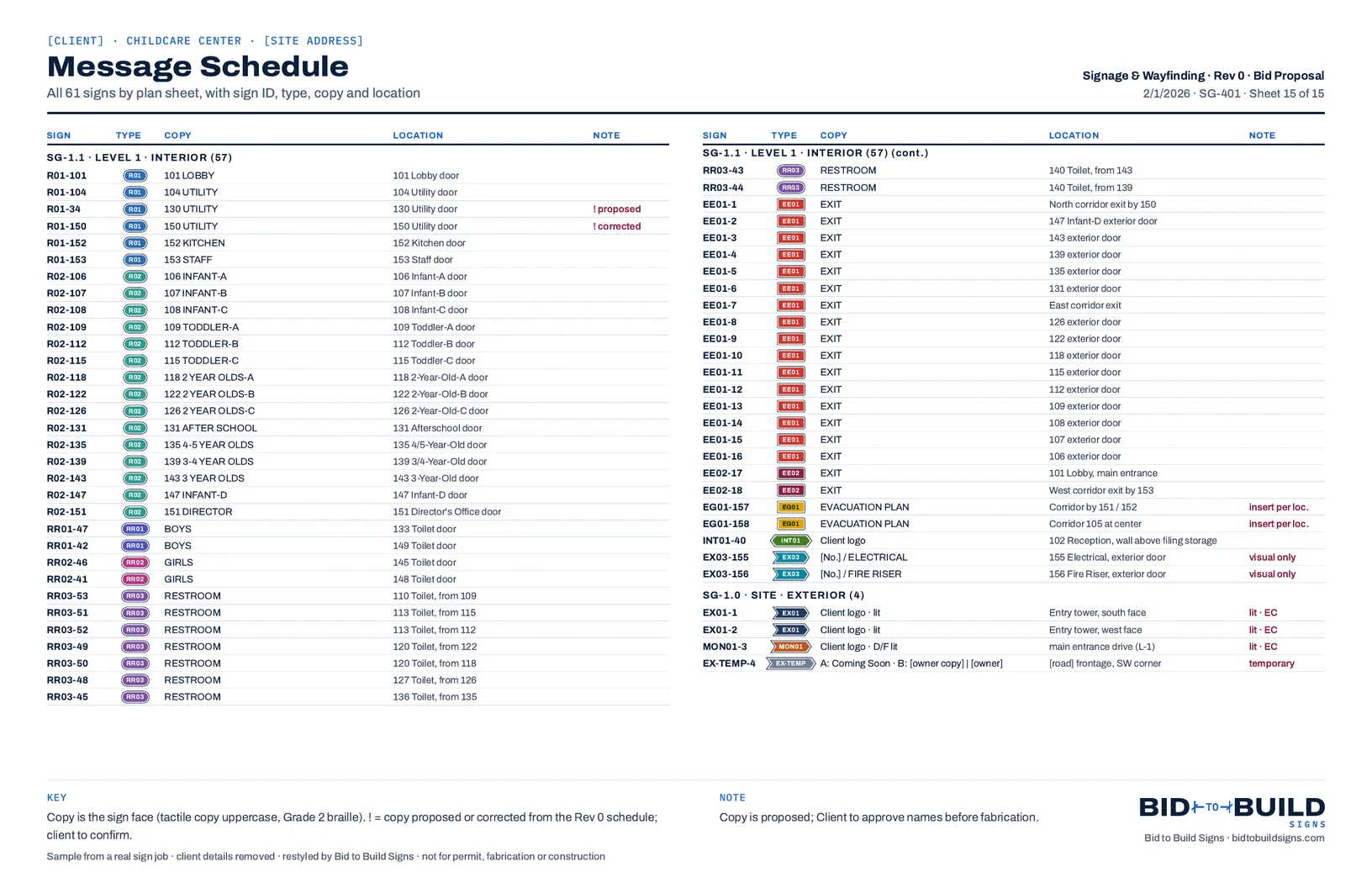
Counting is the easy part. A sign takeoff has to decide where every sign goes, count them by type and size, write the copy for each one, add the braille for the tactile signs, and catch the places where the plans, the schedule and the standard disagree. On the childcare center takeoff we publish, that was 61 signs and 6 open items before anything was priced.
The tools below handle different parts of that. The catch with symbol counting is simple: it finds what's drawn. If the architect drew sign symbols and a legend, a counting tool finds them fast. If the plan shows rooms and doors and no signs, the takeoff still has to work out which rooms, restrooms and exits get one.
- By hand
- Software helps, a person drives
- Automated, a person checks
- Not part of it
Bluebeam Revu
Revu's Count tool works by "placing a symbol each time you click", and the Markups list keeps a running total per page. VisualSearch can "search your entire document for a selected object and apply counts to each result automatically", which is fast when the architect drew the sign symbol. Counts export as CSV or XML, and Quantity Link sends totals to an Excel spreadsheet in real time.
Counting needs a Core, Complete or Max plan in Revu, at $330, $440 or $590 per user a year (Max at an introductory price); Quantity Link needs Complete or Max. The Basics plan, $260, has no count tool in Revu desktop, though its web and mobile versions can count. Bluebeam's AI features are drawing reviews and comparisons; we found no AI counting.
PlanSwift
PlanSwift is "takeoff and estimating software built for construction estimators, from general contractors to specialty trades." Its Auto Count "uses AI to find and count a selected symbol across plan pages", matching by the symbol's shape, its label text or both, up to 10 pages in one run. Auto Scale reads the scale, Auto Bookmark links the sheets, and Auto Takeoff drafts a first pass of walls, areas and counts. Every tool page says to review and verify results before they go into an estimate.
Essential is $2,000 a year for one seat, with Auto Count, Auto Scale and Auto Bookmark; Core is $3,000 a year and adds Auto Takeoff. Signage isn't one of the trades it lists, and Auto Count's best fit, in its own words, is doors and windows, electrical devices and plumbing fixtures. Counts go to Excel or your estimating system.
Mapping Slayer
Mapping Slayer from 3toed Software is "a browser-based professional sign mapping tool for marking locations on PDF documents." It keeps counts by marker type per page and across the project, exports a message schedule as CSV, and its Auto Map finds matching text in the PDF and places markers there; otherwise you place them by hand. It's free through the end of 2026, then sold as time blocks that don't renew on their own, including a year for $120, with prices not yet final.
A takeoff workflow
This is what we set up. The takeoff workflow reads the plan set the way an estimator does: the room tags, the doors, the exits, the code summary and the bid's sign schedule if there is one. It places every sign, counts by type, size and location, writes the message schedule with the copy and the braille, and lists the open items. Your estimator checks it instead of building it.
Where it falls short: it isn't a general-purpose takeoff tool for other trades, and like everything here it's only as good as the drawings it reads, so a person checks every count and open item.
What they cost
| Tool | Price | What you get for counting |
|---|---|---|
| Bluebeam Revu | Core $330, Complete $440, Max $590 per user a year (Max introductory); Basics $260 | Count tool and VisualSearch on Core and up; Quantity Link to Excel on Complete and Max |
| PlanSwift | Essential $2,000 a year, one seat; Core $3,000 a year | Auto Count on Essential; Core adds Auto Takeoff |
| Mapping Slayer | Free through the end of 2026; then time blocks, a year for $120 (not final) | Markers, counts and a CSV message schedule |
| Takeoff workflow | A flat fee per workflow, setup hours included; no monthly fee to us | Placement, counts, schedule, braille and open items, checked by your estimator |
Which one fits?
- Already own Bluebeam? Its count tool and VisualSearch handle signs drawn as symbols, and the Markups list gives you totals. You'll still write the schedule and the braille.
- Taking off other trades too? PlanSwift is priced and built for construction estimators, and its AI Auto Count is fast on repeated symbols.
- Want a sign-specific tool for little or no cost right now? Mapping Slayer is built for sign mapping and exports a message schedule, and it's free through 2026.
- Is the time going into deciding where signs go, writing the schedule and catching what the plans get wrong? That's what a takeoff workflow drafts, for your estimator to check.
- In The plan set comes inThe architect's PDF, plus the bid's sign schedule if there is one.
- Workflow Drafts the takeoffReads the sheets, places every sign, schedules it and lists the open items.
- Your team Checks itThe counts, the copy and every open item, against the plans.
- Your team Prices and sends itProposed for client approval, and never final until someone signs off.
Sources
- Bluebeam Revu: Count tool
- Bluebeam: boost takeoff workflows with the Count tool
- Bluebeam: Markups list summary and export
- Bluebeam: improve takeoffs with Quantity Link
- Bluebeam pricing
- PlanSwift, home page
- PlanSwift Auto Count
- PlanSwift Auto Takeoff
- PlanSwift pricing
- 3toed Software: Mapping Slayer
- Mapping Slayer user guide